7 Photo Habits That Get You Better Outfit Search Results
The single biggest factor in whether a fashion search finds the right thing is the photo itself. Seven habits that make the difference, ranked by how much they matter.
Koral reads the photo, not the caption, so the frame you hand it decides most of what comes back. Get the whole outfit inside the frame, get it large enough in that frame to be read, and leave the colour alone. Everything else on this page is detail. Seven habits, ranked by how much each one actually moves the result, and the last one is a habit to drop rather than pick up.
The short version
- Everything you want found has to be inside the frame. Koral only reads so many garments out of one photo, and it can only search what the crop actually contains.
- Fill the frame with the outfit. A garment that ends up as a tiny patch of the picture gets described rather than matched on its pixels.
- Keep the pieces clear of one another. A garment mostly hidden behind a larger one gets described rather than matched too.
- Leave the colour alone. The colour read out of the photo goes into the search string, so a filter sends the wrong one with it.
- Do not tidy the background. It is removed before anything is detected, so a messy room costs you nothing.
What a photo search actually does with your photo
Photo advice is worthless without a reason attached, and every habit below traces back to something that happens between you hitting search and the results coming back. It is worth two minutes to know what that is, because once you do, the habits stop being a list to remember and start being obvious.
A photo does not go into Koral as one image and come back as one answer. It gets trimmed, stripped, cut into pieces, and each piece is searched by itself. Four separate searches out of one screenshot, which is why the framing of that screenshot matters four times over.
- 1
The screenshot is trimmed down to its subject
Koral takes the box that brackets every real-world object it can find in the image and cuts the frame down to that, which strips out browser chrome, app buttons and whatever else was on screen. When that box already covers most of the photo there was no clutter to remove, so the step is skipped rather than risk tightening a normal shot.
- 2
The background is removed, then the garments are located
Object detection runs on the background-removed image rather than the original, so a busy street or a crowded room is not competing for attention. If the subject is small in the frame, a tighter crop is cut first so detection gets a proper look at a distant figure.
- 3
Each garment is cropped out and searched separately
Each detected garment is cut out of the photo and reverse image searched on its own rather than the whole outfit going in as one blended query, and the results come back head to toe, with outerwear ranked ahead of tops because it is the outermost layer actually visible.
- 4
Footwear gets a second, closer look
Shoes are a tiny share of a full-body photo, so a separate zoomed pass reads just the footwear and tries to name the closest well-known model instead of settling for a generic description of the silhouette.
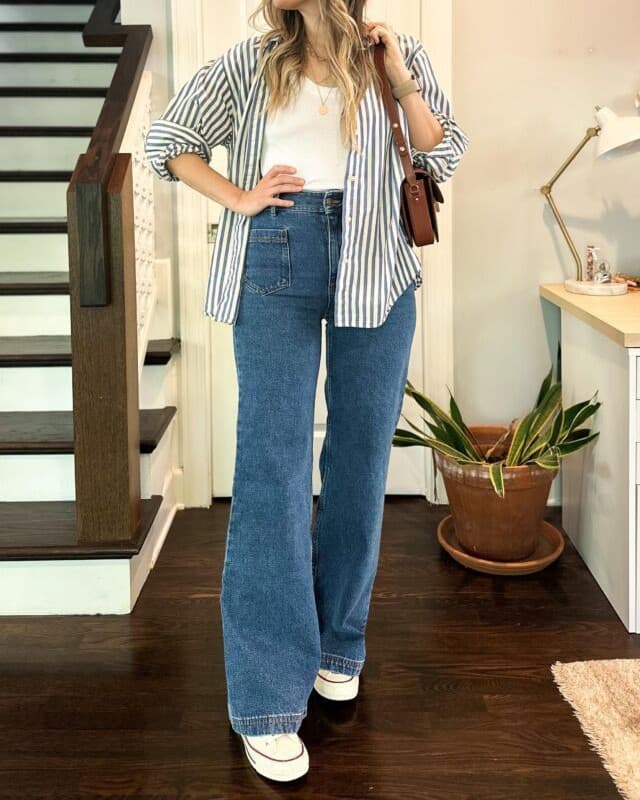
- 01OvershirtCropped out and searched on its own.
- 02Vest topA second crop, searched separately.
- 03Wide-leg jeansCut matters more than shade here.
- 04SneakersGets its own zoomed pass.
Habits 1 to 3: what has to be inside the frame
These three are worth more than the other four put together, because they decide whether a garment gets a real image search at all. The rest of the list improves a search that was already going to happen. These decide whether it happens.
Two photos, both real, both saved off Pinterest by someone who liked the outfit. One of them can be searched piece by piece. The other cannot, and no amount of processing on our side changes that.
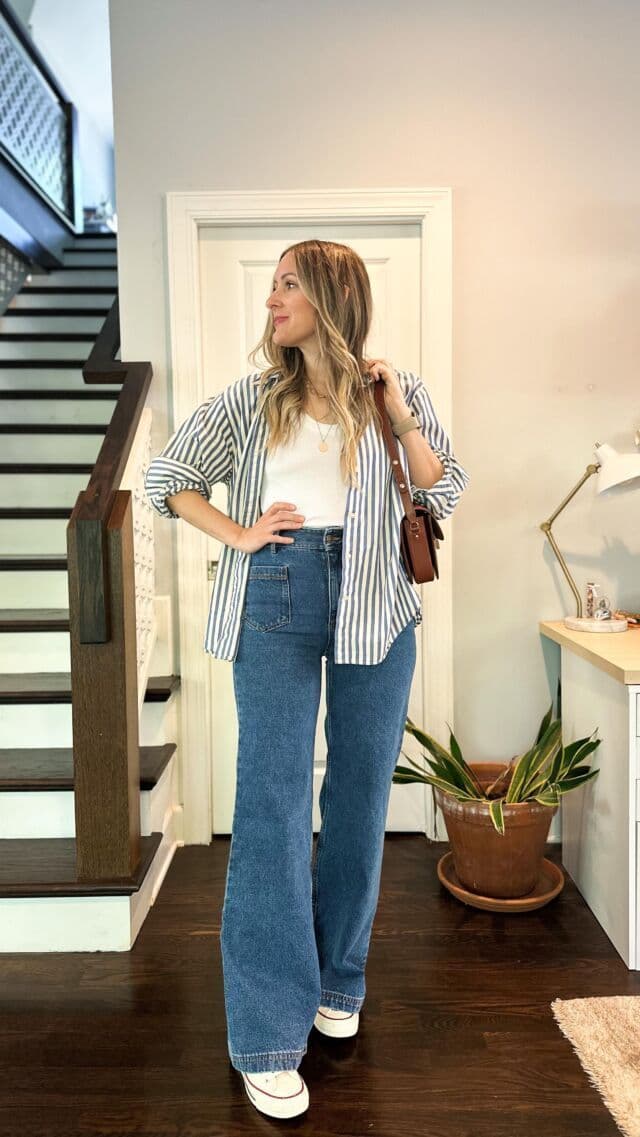
Every piece searchableWhole outfit in frame, nothing covering anythingShoulders to shoes, straight on, each garment separated from the next. Four crops come out of this cleanly, and the shoes are in the frame to get their own pass.Photo via Pinterest 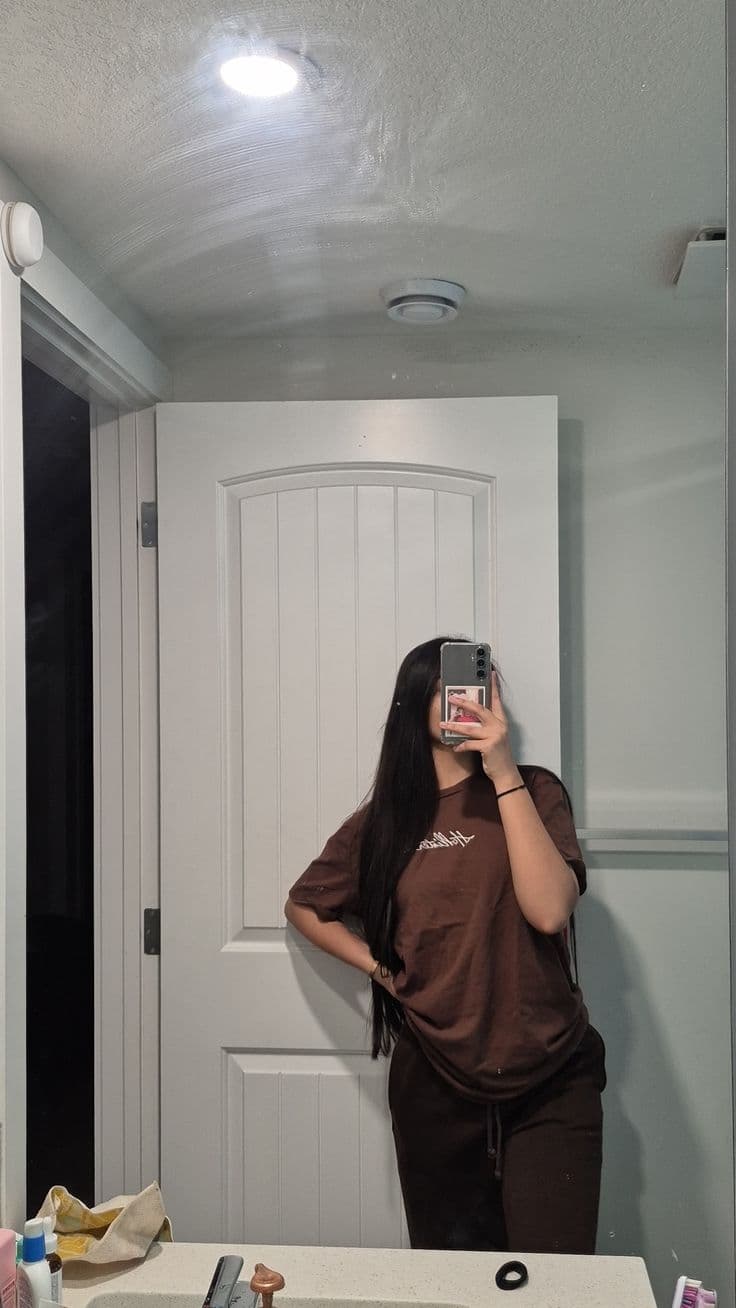
Half the outfit missingThe frame ends above the shoesMost of this photo is ceiling and door. The trousers have no visible hem and the shoes were never in the shot, so two of the four searches have nothing to run on.Photo via Pinterest
- 01
Get the whole outfit inside the frame
Nothing outside the crop exists
The most common way a good outfit photo becomes a bad search is a frame that stops at the knee. Koral reads the garments out of one image and searches each one separately, but it only ever sees what the crop contains. A hem cut off by the bottom edge does not read as a shorter hem, it reads as a garment with no visible end, and where a skirt or a coat stops is exactly the detail that separates a midi from a maxi. Step back a foot before you take the shot. If you are picking between two saved versions of the same post, take the wider one even if the tighter one looks better.
- 02
Then fill that frame with it
Small pieces get searched by text instead
A crop is only worth reverse image searching if it carries enough real pixels to match on. Koral measures every detected garment against the frame it was found in, and anything that comes out as a tiny patch of it gets described rather than matched on its pixels. Text is a real fallback rather than a failure, but it describes the piece instead of matching it, so the specifics a photograph carries get lost on the way. That pulls against habit one, and the resolution is boring: back up until the whole outfit fits, then stop. Standing further off and hoping a closer crop rescues it later is a bad trade. Koral does cut a tighter crop before detection when the subject is small, so a far-off figure still gets located, but no crop puts detail into pixels the camera never recorded. Sunglasses, hats and small accessories are the deliberate exception, since they are legitimately tiny in a full-body shot and among the hardest things to put into words.
- 03
Let the pieces sit clear of each other
A covered garment is worse than a small one
A tote held across your front, a coat buttoned over the top underneath, arms folded across a printed tee. Each of those leaves the covered garment technically visible and practically unsearchable, because any crop tight enough to isolate it also contains the thing sitting on top, and those pixels drive the match. Koral checks this geometrically rather than guessing: a garment mostly hidden behind a larger one is described rather than allowed to return matches for whatever is covering it. The most prominent piece in the photo is the exception, and is always matched on its pixels regardless. So hold the bag out to one side, open the coat, and drop your arms.
If one piece is the whole reason you saved the photo, do not leave it to chance. Crop the image down to that garment and search the crop on its own. It stops being one of four and becomes the only thing in the frame, which is the same advantage the most prominent piece already gets for free.
Nothing outside the crop exists. That one sentence is most of this page.
Habits 4 and 5: what the photo does to the garment
Framing decides whether a piece gets searched. Angle and colour decide whether the search is looking for the right thing. Both of these are ways of accidentally describing a garment that is not the one in front of you.
- 04
Shoot the cut straight on
Fit and cut carry more weight than colour
For trousers, jeans and skirts, the line of the garment is the thing that identifies it. Straight, skinny, bootcut, wide leg, baggy, tapered: those distinctions count for more in a match than whether the denim is mid blue or a shade darker, and they are precisely what a three-quarter angle flattens. Shot from the side, a wide-leg jean reads as roughly trouser-shaped and not much else. Stand square to the camera for anything below the waist, and if the person in the photo is caught mid-turn, go and find another frame.
- 05
Leave the colour alone
The colour you shoot is the colour searched
Koral describes each garment in words as well as matching it by image, and the colour it reads out of the photo is the colour that ends up in the query. A black and white edit does not produce a query with no colour in it, it produces one where an olive jacket is grey. A heavy warm preset turns cream into beige. A flash fired at a navy coat can flatten it to black. None of this asks for a studio: daylight or a bright window with the filter switched off is enough, and an ordinary photo with honest colour will beat a beautiful one with the colour pushed.
Set the two failure modes side by side and the difference in cost is obvious. A filter removes information that was in the original photo. A messy room never removed anything.
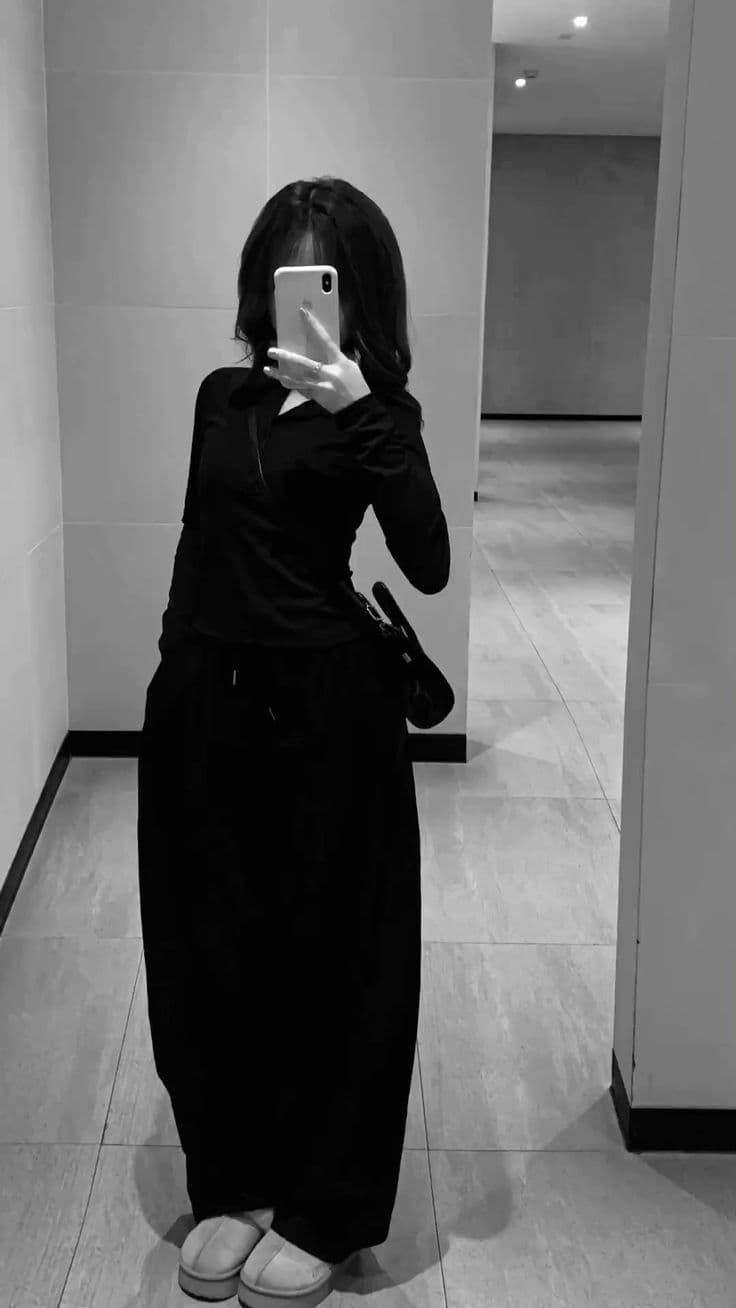
Colour gone before the searchA good frame with the colour edited outFraming, angle and distance are all fine here. The edit is the problem. You cannot tell from this frame whether that skirt is black, navy or a deep green, and neither can a search.Photo via Pinterest 
Clutter costs nothingBad room, perfectly readable outfitAn unmade bed, laundry across the floor and a phone over the face. None of that survives background removal, and the top, the jeans and the trainers are all clear of each other.Photo via Pinterest
Habits 6 and 7: the one people skip and the one they overdo
The last two are a pair, and they pull in opposite directions. One is a small effort almost nobody makes. The other is an effort a lot of people make for no return at all.
- 06
Search a still, not a moving frame
The sharpest piece wins the guaranteed search
Pausing a video hands you a frame that was never meant to be looked at on its own. Motion smears the edges garments are located by, and it does something less obvious as well. Koral marks one item in every photo as the main item, the piece that is most prominent and most clearly in focus, and that item is the only one guaranteed a reverse image search whatever else happens: if no usable crop can be resolved for it, the whole photo is searched as-is rather than dropping it to text. On a blurred frame, that guarantee lands on whichever piece happened to be sharpest, which may not be the one you cared about. Scrub a few frames to a moment where the person is standing still, and pick one with no caption or sticker sitting over the clothes.
- 07
Stop tidying the background
It is removed before anything is detected
This is the habit worth un-learning. An unmade bed, a rail of other clothes, a crowded pavement: none of it costs what people assume, because the background is stripped out before the garments are located and a screenshot is cropped to its subject before that. The effort you were about to spend clearing a shelf is worth far more spent on the frame, the angle and the light. Search a photo taken in a bad room rather than not searching it at all.
A cluttered photo of a visible outfit beats a tidy photo of a hidden one, every time.
What happens to the words you add alongside the photo
Plenty of people type something in with the photo, and it is worth knowing which parts of that survive. The occasion does not survive into the search, because "wedding" or "date night" describes an event rather than a garment and dilutes the match. Queries are gendered rather than left open, which sounds trivial and is one of the biggest sources of junk in clothing search. And for bottoms in particular, fit and cut are weighted over colour, which is the same reason habit four asks you to shoot the leg line straight on.
What that means in practice: a brand name, a material or a retailer you type is genuinely useful. An occasion is not. Describe the garment, not the evening.
weddingguestwide-legjeans,midblue
The occasion goes, the department is made explicit, and for jeans, trousers and skirts the cut outweighs the shade, since the silhouette is what identifies the piece.
The seven at a glance
Ranked by how much each one moves the result, with what it actually asks of you.
| Habit | What it changes | What it costs you |
|---|---|---|
| 01 Whole outfit in frame | A cropped-out piece cannot be searched at all | One step backwards |
| 02 Fill the frame | Very small crops route to text search instead of image search | One step forwards |
| 03 Pieces clear of each other | A garment mostly hidden behind another is described, not matched | Moving a bag to one side |
| 04 Straight-on angle | Cut and silhouette are what identify bottoms, not colour | Turning to face the camera |
| 05 No filter | The colour read from the photo is the colour searched | Switching an edit off |
| 06 A still frame | Blur decides which piece gets the guaranteed image search | A few seconds of scrubbing |
| 07 The background | Nothing, it is removed before detection runs | Nothing, stop doing it |
Where this does not work
Technique has a floor, and it is worth being straight about where it sits.
- Some photos cannot be rescued by technique. A figure shot from across a car park, a dim reflection in a mirror on the far side of a room, a screen recording reposted until the weave of the fabric is mush: there is no crop that puts detail back into pixels that never held it. Take another photo, or describe the piece in words instead.
- Better habits raise the odds, they do not promise an exact match. A garment that was never sold online, a vintage find, or something discontinued years ago has no listing to return, and a perfectly framed photo of it still comes back with the nearest visual siblings rather than the thing itself.
- Four garments is a ceiling, not a target. A look with a shirt, a top, jeans, a bag and shoes has five shoppable pieces in it and only four get searched. If the bag is the piece you actually want, crop to it and search it on its own rather than hoping it makes the cut.
- Most of this is advice about a photo you did not take. When the image is a saved post rather than your own shot, the framing, the filter and the crop were all decided by somebody who was not thinking about search. Pick the clearest version you can find, crop it, and accept the rest.
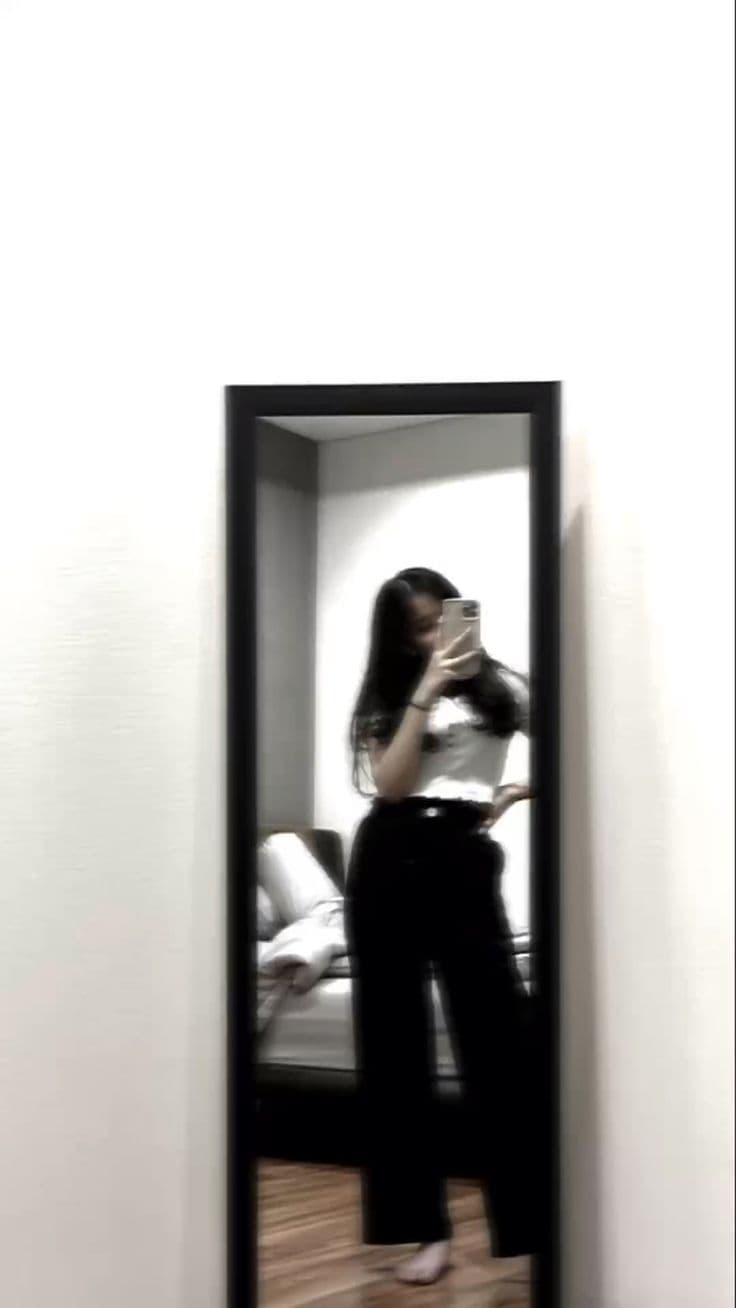
When a photo is genuinely past saving, the better move is to stop fighting it and describe the piece in words instead, which works better than most people expect when the image itself is the thing letting you down.
Frequently asked questions
Related guides
Try it on the worst photo you have.
Pull up something from your camera roll, framing flaws and all, and drop it into Koral. It trims the screenshot, strips the background, crops out each garment it can find and searches them one by one against real retailer stock. The habits on this page make that work better. They are not a condition of it working.
Start a search